A/B tests and variants
They answer two separate questions: does the coupon bring more at all (control group), and which design or offer brings the most (variants).
No-coupon control group
- In the rule’s No-coupon control group (optional) section switch on Hold back some visitors to measure uplift.
- Set Share of visitors who get the coupon, for example to 90%: 10% of visitors get no coupon.
The split is random but fixed per visitor. Reports compare the conversion and revenue of the two groups: that shows the extra the coupon brings.
Variants
- In Variants: test designs and offers click + Add variant. A is the original: the rule’s pool and its design. B, C and D can have their own design and their own coupon pool.
- Visitors who get a coupon are split evenly between the variants and always see the same one.
- Choose Pick the winner by (for example revenue per visitor) and, if you like, switch on End automatically when a winner is clear.
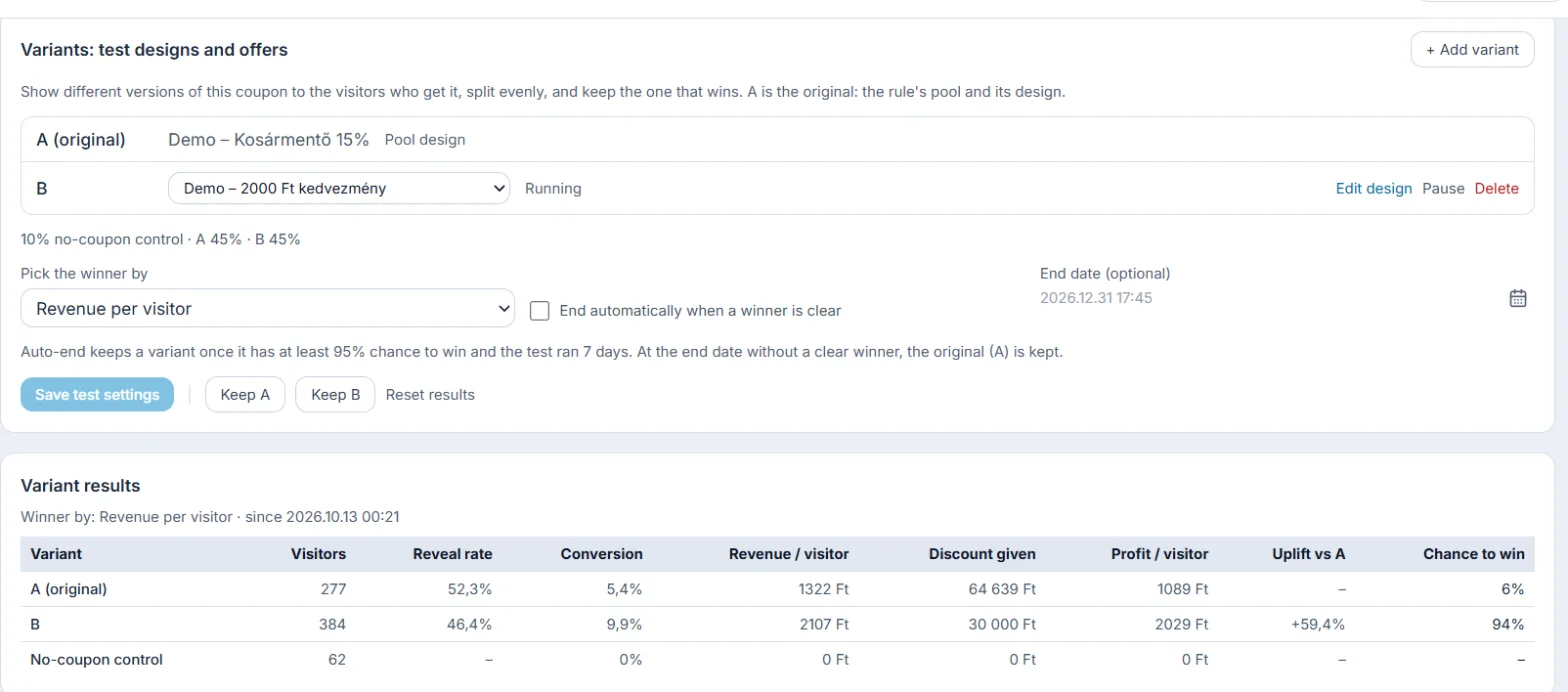
Auto-end keeps a variant once it has at least 95% chance to win and the test has run for 7 days. At the end date without a clear winner, the original (A) is kept. You can also keep a variant by hand at any time; the others are then deleted and everyone sees the winner.